
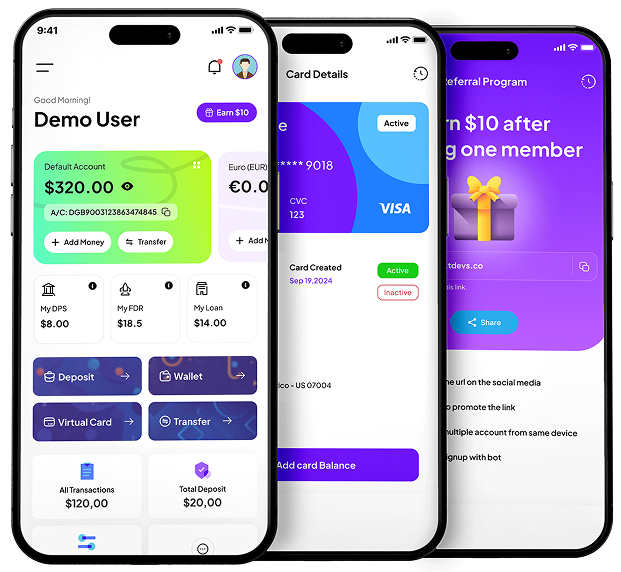


Digibank App Main Features

User Dashboard
Users can easily view their information, wallet balance, and recent transactions. All in one place for quick access and control.

Dark & Light Mode
Users will be able to switch between dark and light themes to suit their style or eye comfort.

Biometric
The user can log in instantly using their fingerprint. No need to remember the password.

Deposit
Users can deposit from here using any automatic or manual deposit method.

Fund Transfer
Users can transfer the funds to another bank user or the same bank. Also, can transfer the Wire and Swift.
DPS
Users can DPS any of the plans and get the profit after the time period.

FDR
Users can FDR any of the plans and get the profit after the period. Also, apply for the Loan and get the funds in their account.

Pay Bill
The user can pay the bills using this section. It will be available for some particular countries.

Virtual Card
Users will be able to view and manage all their virtual cards.

Transactions
User All Transactions will show there.

Withdraw Money
The User needs to add a Withdraw account first, then can request a Withdraw. The admin needs to review the request and send money to the user manually.

Referral
All the user’s Referral details will show here. Also can be shown the referral tree.

Portfolio
Under the portfolio user can see the unlocked and locked badges.

Rewards
Under the Rewards page user can explore the reward points and can redeem them.

Support Ticket
The user can open a ticket to the admin, and the admin can reply to that ticket to solve the issues or anything.

Settings
On the settings page, the user can edit and update all the profile settings. Also can change the Password, manage the security, submit the KYC, etc.

25+
Payment Gateways

























All the App Features

Deposit


Multi Wallet

Digital Banking

Virtual Cards

FDR

DPS

Loan
DPS Installments
FDR Installments

KYC Management
Transactions

Automatic Payment Gateways

Fund Transfer
Wire and Swift Transfer
FDR Compounding
Bill Payments

Portfolio

Reward Points

Automatic and Manual Deposit

Automatic & Manual Withdraw

Crypto and Fiat Currency

Multi Level Referrals and Tree

Language Translatable

Dark & Light Mode

Biometric

Smooth Transition

Notifications

Fully Mobile Responsive

Crypto and Fiat Currency

2FA Verification

Fund Add and Subtract

Support Ticket Management
Professional Installation Services for Product Setup
Frequently Asked Questions
With the Digibank app, you can deposit and withdraw money, manage your virtual cards, pay bills, check transaction history, and monitor your balance.
Key features include fund transfers to other banks, DPS, FDR, Loan, virtual card creation, KYC verification, multi-language support, transactions, notifications, and an admin panel with robust analytics and management tools.
You can log in using your fingerprint, offering a faster and more secure way to access your account.
The virtual card feature allows users to create secure virtual cards for online transactions, ensuring privacy and protecting sensitive bank details.
Yes, Digibank offers multi-language support, making the platform accessible to a global audience.
Yes, Digibank supports multi-language and multi-currency transactions, making it ideal for users across the globe.
Launching Digibank as your brand is simple. Purchase the script, upload it to your server, customize the branding, and configure the platform to suit your business needs.



What I Need to Start

1. Buy Digibank Script

2. Buy Digibank App

3. Set Up Hosting

4. Connect Domain

5. Configure Services